
Download Microsoft IntelliPoint Driver (32-bit) – Mouse Customization, Button Reassignment, Pointer Speed, Application-Specific Settings, Automatic Updates
Overview
Microsoft IntelliPoint Driver (32-bit) is a specialized utility designed to enhance the functionality of Microsoft mice on Windows systems. Its primary purpose is to enable users to customize and optimize their mouse experience through advanced configuration options. The software allows for the reassignment of mouse buttons, adjustment of pointer speed and precision, and fine-tuning of scrolling behavior. These capabilities are particularly valuable for users who rely heavily on precise mouse control, such as graphic designers, software developers, and power users navigating complex workflows.
The app addresses common limitations of standard mouse drivers by offering granular control over device behavior. It supports application-specific button assignments, meaning users can configure different functions for the same mouse button depending on the active program. This feature significantly improves productivity by reducing the need to switch between tools or use keyboard shortcuts. The driver also includes support for automatic updates, ensuring users receive the latest improvements and security patches without manual intervention.
Targeted primarily at Windows users with Microsoft mice, the software integrates seamlessly into the operating system environment. It is especially relevant for legacy systems still running 32-bit architecture, where compatibility with newer drivers may be limited. The developer, Microsoft, is a well-established name in software and hardware integration, lending credibility to the tool’s reliability and long-term support. Real-world use cases include customizing shortcut keys for design software, streamlining navigation in coding environments, and adapting mouse behavior for accessibility needs.
Key Features & Functionality
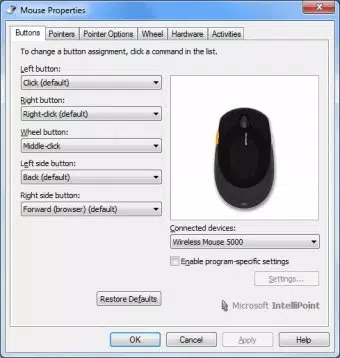
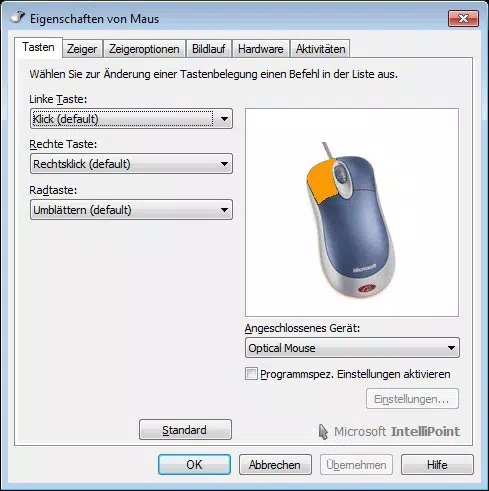
- Reassign Mouse Buttons: Users can customize the primary, secondary, and wheel buttons to perform specific actions such as Undo, Copy, Paste, or launch predefined macros. This enables a more efficient workflow tailored to individual preferences.
- Application-Specific Button Assignments: The driver allows different button behaviors per application. For example, the side button can trigger a zoom function in a design tool but act as a back button in a web browser, enhancing context-aware functionality.
- Modify Mouse Settings: Users can adjust pointer speed, precision, acceleration, and scrolling speed to match their working style. This ensures smooth and accurate cursor movement across various screen resolutions and display types.
- Automatic Updates: The software can be configured to update automatically, ensuring that users always have access to the latest features, bug fixes, and security enhancements without manual intervention.
- Customer Experience Improvement Program: An opt-in feature that collects anonymized usage data to help Microsoft refine future versions of the driver, contributing to long-term product development.
These features are especially beneficial in professional environments where efficiency and customization are critical. For instance, a video editor might assign the mouse wheel to scroll through timeline markers, while a data analyst could map a button to open a frequently used spreadsheet template. The ability to tailor mouse behavior to specific tasks reduces cognitive load and increases workflow speed.
Interface, UX & Performance
Microsoft IntelliPoint Driver (32-bit) presents a clean, functional interface that aligns with the Windows design language. The layout is organized into logical sections—button mapping, pointer settings, application profiles, and update preferences—allowing users to navigate through configurations with minimal effort. Menus are intuitive, and tooltips provide guidance for less experienced users.
Navigation is consistent across all settings, with clear labels and immediate visual feedback when changes are applied. The software responds promptly to user inputs, and configuration changes take effect instantly. Although the developer did not list formal performance metrics, the lightweight nature of the driver (10.7 MB) suggests minimal impact on system resources. It runs efficiently on both older and modern Windows systems, maintaining stability during extended use.
Responsiveness is maintained across different device categories, including desktops and laptops with integrated Microsoft mice. The driver does not introduce noticeable lag or crashes during operation. Users can expect consistent performance when switching between applications or adjusting settings on the fly. The absence of resource-heavy animations or background processes contributes to its reliable behavior.
Platform Compatibility & Technical Requirements
Microsoft IntelliPoint Driver (32-bit) is designed exclusively for Windows operating systems. It supports the Windows platform and is compatible with systems running version 10.0.1, as specified in the release information. The file size of the driver is 10.7 MB, making it a lightweight download suitable for users with limited bandwidth or storage.
Although the developer did not specify minimum OS requirements, the version number suggests compatibility with Windows 10 and later. Given its 32-bit architecture, it is intended for use on older systems that may not support 64-bit drivers. The driver is not available for iOS, Android, or other mobile platforms, as it is strictly a desktop utility.
Compatibility information was not fully disclosed, so users should verify system architecture before installation. The driver does not require additional software or hardware beyond a compatible Microsoft mouse and a functioning Windows environment.
Pros and Cons
Pros
- Enables deep customization of Microsoft mouse functions
- Supports application-specific button configurations
- Lightweight installation (10.7 MB)
- Automatic update capability ensures ongoing improvements
- Free to download and use
- Developed by Microsoft, ensuring trust and reliability
Cons
- Available only for 32-bit Windows systems
- Not compatible with newer 64-bit architectures
- Limited to Microsoft mice
- Developer did not provide detailed system requirements
- Interface is functional but lacks modern visual polish
FAQ
Is Microsoft IntelliPoint Driver (32-bit) safe to install?
Yes, the driver is officially developed by Microsoft and distributed through trusted channels. It does not contain malware or unwanted software.
Can I use this driver on a 64-bit Windows system?
Due to its 32-bit architecture, the driver is not compatible with 64-bit Windows systems. Users should look for a 64-bit version if available.
Does the driver require an internet connection?
While the driver functions offline, automatic updates require an internet connection to download the latest version.
How do I uninstall IntelliPoint if needed?
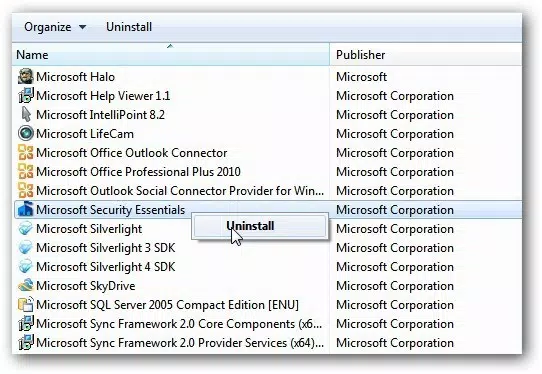
Users can remove the driver through the Windows Control Panel under "Programs and Features" or via the built-in uninstaller provided during installation.
Is IntelliPoint Driver (32-bit) free to use?
Yes, the software is available at no cost. There are no hidden fees or subscription models.
Final Thoughts
Microsoft IntelliPoint Driver (32-bit) remains a valuable tool for users of Microsoft mice on legacy Windows systems. Its ability to reassign buttons, customize pointer behavior, and apply settings per application delivers a highly personalized experience that boosts productivity. While its 32-bit limitation restricts use on modern systems, it fills a critical gap for users still relying on older hardware.
For professionals and power users who demand precision and efficiency, this driver offers a robust solution without compromising system performance. Its free availability, reliable updates, and Microsoft-backed support make it a secure and practical choice.
Download Microsoft IntelliPoint Driver (32-bit) now to unlock the full potential of your Microsoft mouse.


